How to Screen cast on Android – Step by Step
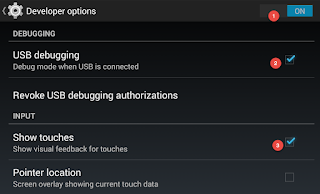
If you would like to record screencast videos of your own Android phone, the good news is that you don’t need to install any app nor do you have to root your device. The not-so-good news is that you can only capture screencasts on phones (or tablets) that are running Android 4.4 or later. Also, screencasts will not have any audio. Step 1: Prepare your Android Device for Screencasting Open your Android phone settings and go to About Phone, the last option in the list. Next tap Build Number seven times in quick succession and you’ll see a message saying that Developer Options have been enabled in your device. Step 2: Prepare your computer (Windows or Mac) We need to install the Android SDK on our desktop. This is simple. All you have to do is download the SDK in a zip file from the android.com website and unzip the file anywhere on your computer. The Android SDK is available for both Mac and Windows. Step 3: Connect your Android phone to the desktop First connect your A...