Posts

Download Innjoo Stock ROM

Image
Download Innjoo Stock ROM To download and learn how to use SP Flash Tools to unbrick your phone, click here To download and learn how to create Scatter file and ROM Backup using MTK Droid Tools click here Innjoo i1 Innjoo i1k Innjoo i1s Innjoo i2 Innjoo i2s Innjoo Fire Innjoo Fire Pro Innjoo Fire+ LTE Innjoo Fire+ 3G Injoo Fire 3D HD Innjoo Halo Innjoo One 3G HD OS5.1 Innjoo One 3G HD OS4.4 Innjoo One LTE HD Innjoo Note Innjoo Note E Innjoo Note Pro

Download All Gionee Stock ROM

Image
Download all Gionee Factory Stock ROM firmware. To download and learn how to use SP Flash Tools to u n-brick or upgrade your phone, click here   To download and learn how to create scatter file and ROM Backup using MTK Droid Tools click here Get all Gionee tools from here Gionee D1 Gionee E3 Ginger Bread Gionee E3 Kitkat Gionee E5 Gionee E6 Gionee E7 Mini Gionee Elief E7 16GB Gionee Elief E7 32GB Gionee G1 Gionee G2 Gionee G3 1G RAM Gionee G3 512 RAM Gionee G3 8G ROM Gionee G4 Gionee G5 Gionee L700 Gionee L800  Gionee M2 4GB Gionee M2 8GB Gionee M3 Ginger Bread Gionee M3 Kitkat Gionee M3 Lollipop Gionee M5 Lite Gionee_M5_BBL7313GI   Gionee_M5_T6184   Gionee P1 OS 2.3 Gionee P1 Gionee P2 OS 4.2 Gionee P2S OS 4.2 Gionee P2 New Gionee P3 Ginger Bread Gionee P3 Kitkat Gionee P4S OS 4.4.2 Gionee P4 Ginger Bread Gionee P4 OS 4.4.2 Gionee P4 Kitkat Gionee P5.1 OS 4.4.2   Gionee P6 OS 5.0 Gionee S Plus 0204-...

How to Create Stock ROM Using MTK Droid Tools

This Method will tech you how to create stock ROM using MTK droid tools, it is the same for all MTK Android Devices . Tools Require * A working Android phone * Download PdaNet * Download MTKDroid Tools * PC * USB Cord * Enough space  (at least 4GB) on the SD card / phone Storage (to avoid the insufficient storage space error) Please Note * If you get an error saying "Error: file adb not install" click here to fix it * If you get an error saying "insufficient space on device" then ensure there's at least 4GB free space on both phone storage and SD card (if supported) then install Busybox on the phone * If you get an error like "Preparation of files for FlashTool is impossible, file isn't found" then remove all scatter files in the backup folder except one and rename this last one to MT65??_Android_scatter ( where "??" represents the number for your phone model e.g MT6572_Android_scatter) * If you get an error like ...

How To Unbrick Android Phone Using SP-Flash Tools

Image
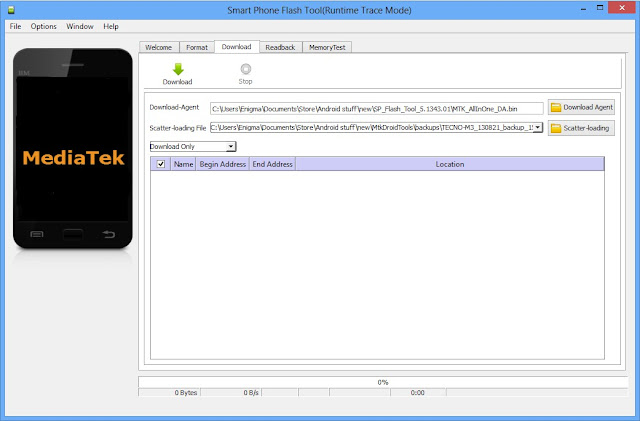
Have you damage your handheld device software? Do you want to fix it and don`t know how? This simple and effective method will teach you how to unbrick android phones using Sp-flash tools   Requirement * A PC * USB Cord * Click here to download and Manually install VCOM drivers on your PC * Ensure there's an SD card in the phone you wish to flash the files to * Scatter file + files to be flashed Click here to see how to make an MTK Backup). * Download SP Flash tool ( Version 5.x  ) Note If you get any error in SP Flash tool or the phone still didn't work after flashing, I made a list of SP Flash Tool errors, their meanings and how to resolve them click here to see. Procedure Remove the battery from the phone and slot it back in without booting the phone (If the battery is inbuilt then simply switch if off). Also, ensure there's a formatted SD card in the phone (if there's an SD card slot) Launch SP Flash Tool as Administrator Click on ...

How To Install MT65xx MediaTek USB VCOM Drivers on Window Manually

This tutorial will teach you how to install MT65xx mediatek USB VCOM drives on any w indows operating system manually. It is a straight and painless procedu re, so s it back and enjoy. Requirement Download  MediaTek USB VCOM drivers Download USB Deview ( 32 bit here : 64 bit here ) Note:   You might need to disable drivers signature verification in Windows for this to work smoothly.  If you have access to a working phone of the same model then remove the battery from the working phone and connect to PC via USB cord. Mediatek preloader VCOM drivers should be automatically installed so you can skip the rest of this guide Procedure Install USB Deview and use it to uninstall all Vcom, Mediatek and Preloader drivers Extract the contents of the Mediatek USB VCOM file above ( input Hovatek if it file re quest for a password when extracting ) In Windows, go to Control Panel and open Device Manager Click any of the device groups (any...

Download All HTC RUU Stock ROM Files

Image
Download All HTC RUU Stock ROM Files To learn how to flash, unbrick and upgrade HTC devices using any of the RUU files below, please click here for detailed illustration and procedures. Select and Download any of your required HTC Stock ROM/RUU Files. Arranged in no particular order...   If yours isn`t on the list, please click here to download other HTC Stock ROM HTC Desire HTC Holiday HTC Butterfly HTC Incredible HTC One HTC One M8 HTC One Max HTC One V HTC One VX HTC Pyramid (Sensation) HTC Ace HTC Liberty HTC Shooter HTC Legend HTC Epic Touch 4G HTC Endeavor HTC Hero HTC Dragon HTC Click HTC Doubleshot HTC Bravo HTC Bravo C HTC Buzz   HTC Chacha HTC Evita HTC Flyer HTC Saga HTC Jewel HTC Pico HTC Sapphire HTC Speedy HTC Vision HTC Vigor HTC Vivo HTC Vivo W HTC Ville HTC Mavel HTC Runnymede HTC Kingdom HTC Mecha HTC Huangshan HTC Lexikon If yours isn`t on the list, please click here to download other H...

How To Flash Unbrick And Upgrade HTC Devices Using RUU Files

Image
This tutorial will guide you on how to how to flash or unbrick or upgrade HTC devices using RUU Files If you`ve messed up your HTC device either by rooting, installing some custom ROM etc or you just want to get back to the default stock ROM, follow the simple guide below. Note: A wrong RUU will not install on your device. So no harm. If you want to install RUU files of different variant of your device you will need to be on super CID. Watch video tutorial from here Download an install android USB drivers from here Boot up your phone by pressing volume down and power button Check the model of the device you want to flash example Pyramid. Check the radio version (This is very important). Use power button to select fast-boot on your device. Download the RUU file of your device. Make sure the file you are downloading has the same radio version with the one of your device. Get RUU files from here L...