How to Hard Reset Nokia Lumia and Microsoft Lumia Phones
This guide will teach you how to hard reset Nokia Lumia and Microsoft Lumia phone. If
you want to hard reset your Nokia Lumia or Microsoft Lumia phones
because of reasons like security code or software malfunction, do the
following below.
*All file and apps will be erased after this process. It is recommended you backup your device before proceeding.
Supported Device: Nokia Lumia 520/635/710/810/925 etc
1) Put OFF the device
2) Press Power Button
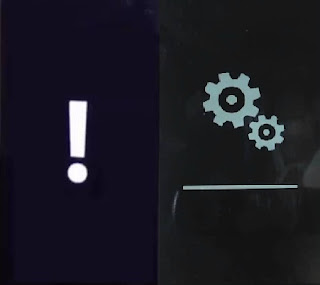
When phone vibrates leave power button and press volume down button till you see exclamation sign !
3) Now press the following button combination
Volume up(+)> Volume down (-)> Power > Volume Down(-)
Phone will reboot and you will see gear like wheel spinning .
4) Wait for 10-25min for process to complete.
Phone will reboot after process is complete..
For Lumia 800 / 900
Wait for process to complete as it could take close to 8 - 30mins.
*All file and apps will be erased after this process. It is recommended you backup your device before proceeding.
Supported Device: Nokia Lumia 520/635/710/810/925 etc
1) Put OFF the device
2) Press Power Button
When phone vibrates leave power button and press volume down button till you see exclamation sign !
3) Now press the following button combination
Volume up(+)> Volume down (-)> Power > Volume Down(-)
Phone will reboot and you will see gear like wheel spinning .
4) Wait for 10-25min for process to complete.
Phone will reboot after process is complete..
For Lumia 800 / 900
- Put OFF the device
- Press and hold Volume down(-) > Camera >Power button for about 10 secs
- When phone vibrates release Power button but still hold on to Volume down(-) and Camera button
Wait for process to complete as it could take close to 8 - 30mins.


Comments
Post a Comment