How To Flash or Upgrade Samsung Smartphone Devices Using Odin
This method will show you how to flash, upgrade or unbrick Samsung
devices using Odin. Please follow these simple steps below carefully so as to
avoid permanent damage on your smart phone.
Download an install Samsung USB Drivers here.
Download Odin (latest version preferred) here.
Download the exact ROM for your device. Check and download Samsung ROM(s) click here
Click here to watch the Video Illustration
- Launch Odin
- Make sure only Auto Reboot & F. Reset Time is ticked.
- Put your device into download mode by pressing down Volume Down > Home > Power key
- Press volume up on the screen that has a yellow triangle to get into Odin mode.
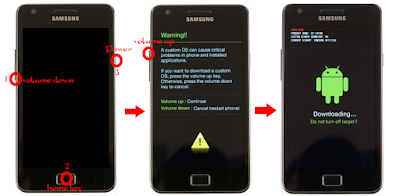
- Connect the device to the computer.
- Added!! will be seen showing the device has connected successfully.
- Click on AP (new versions of Odin) or PDA (older versions of Odin).
- Navigate to the folder containing the ROM of the device.
- Select the ROM. (ROM(s) names always end with .tar or .md5).
- Wait for Odin to process the ROM.
- Click start.
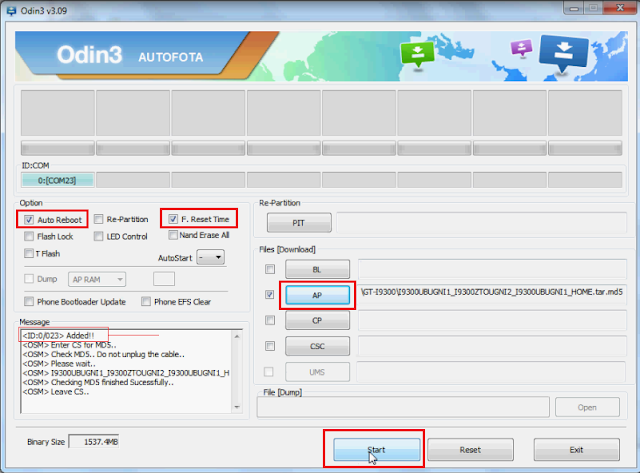
The flashing or upgrading process will now begin.
A green progress bar will be seen at the top left.
This process will take about 8mins or more (depends on the size of the ROM.
When you see PASS! at the top of Odin GUI know that you have successfully flashed or upgraded the device
A green progress bar will be seen at the top left.
This process will take about 8mins or more (depends on the size of the ROM.
When you see PASS! at the top of Odin GUI know that you have successfully flashed or upgraded the device
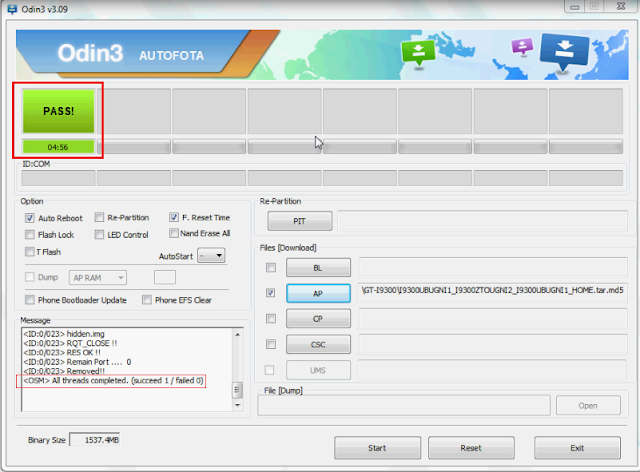
The device will reboot.
First boot after this process takes time. Be patient.......................
Do a factory reset if phone boot-loops.
Press Volume up > Home > Power key
Select factory reset.
First boot after this process takes time. Be patient.......................
Do a factory reset if phone boot-loops.
Press Volume up > Home > Power key
Select factory reset.
You will see No No No No No
Scroll down to Yes.
Scroll down to Yes.
And Reset Your Device


I try this software for may s5 but its have to many issue .
ReplyDeletei think if you are not understand you never take any risk
to use this Odin after you can face software issue .
Best Console Repair Shop | Laptop Repair Specialist In Manchester
Phone Mail Repair In Manchester